Desenhos simples
|
Os
arquivos abaixo foram extraídos do Livro: An Introduction to Graphical User Interfaces with Java Swing |
|
package
its.SimpleGraphics; /** * Example
program for Introduction to Swing * @author Paul Fischer, IMM, DTU * @version 1.0 */ public class
SimpleGraphicsDriver { public SimpleGraphicsDriver() { SimpleGraphicsFrame SGF = new
SimpleGraphicsFrame(); SGF.showIt(); } public static void main(String[] args) { SimpleGraphicsDriver sgt = new
SimpleGraphicsDriver(); } } |
|
package its.SimpleGraphics; import its.SimpleFrame.SimpleFrame; import java.awt.BorderLayout; /** * Example program for Introduction to Swing * @author Paul
Fischer, IMM, DTU * @version 1.0 */ public class SimpleGraphicsFrame extends SimpleFrame { public
SimpleGraphicsFrame() {
this.setTitle("Simple Graphics"); SimpleGraphicsPanel
SGP = new SimpleGraphicsPanel();
this.getContentPane().add(SGP,BorderLayout.CENTER); pack(); } } |
|
package its.SimpleGraphics; import java.awt.*; import javax.swing.JPanel; /** * Example program for Introduction to Swing * @author Paul
Fischer, IMM, DTU * @version 1.0 */ public class SimpleGraphicsPanel extends JPanel { public
SimpleGraphicsPanel() { this.setBackground(Color.white);
this.setPreferredSize(new Dimension(300,300)); } public void
paintComponent(Graphics g) {
super.paintComponent(g);
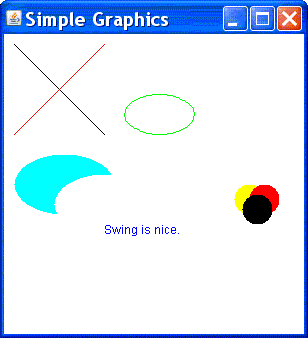
g.setColor(Color.black);
g.drawLine(10,10,100,100);
g.setColor(Color.red); g.drawLine(10,100,100,10);
g.setColor(Color.green);
g.drawOval(120,60,70,40);
g.setColor(Color.yellow);
g.fillOval(230,150,30,30);
g.setColor(Color.red);
g.fillOval(245,150,30,30);
g.setColor(Color.black);
g.fillOval(238,160,30,30);
g.setColor(Color.cyan);
g.fillOval(10,120,100,60);
g.setColor(this.getBackground());
g.fillOval(50,140,100,60);
g.setColor(Color.blue);
g.drawString("Swing is nice.",100,200); } } |
esboço:
O programa
abaixo extraido do livro
Java for
Students tem erros conceituais:
import java.awt.*;
import java.awt.event.*;
import javax.swing.*;
public class java4students extends JFrame
implements ActionListener {
private
JButton button;
private JPanel panel;
public static void main(String[] arg ){
java4students frame = new java4students();
frame.setSize(400, 300);
frame.createGUI();
frame.setVisible(true);
}
private void createGUI(){
setDefaultCloseOperation(EXIT_ON_CLOSE);
Container window = getContentPane();
window.setLayout(new
FlowLayout() );
panel = new JPanel();
panel.setPreferredSize(new Dimension(300, 200));
panel.setBackground(Color.white);
window.add(panel);
button = new JButton("Press me");
window.add(button);
button.addActionListener(this);
}
public void actionPerformed(ActionEvent event) {
Graphics paper = panel.getGraphics();
paper.drawLine(0, 0, 100, 100);
}
}
Exercício:
qual é o erro? Como escrever uma versão
do programa acima sem o erro conceitual?